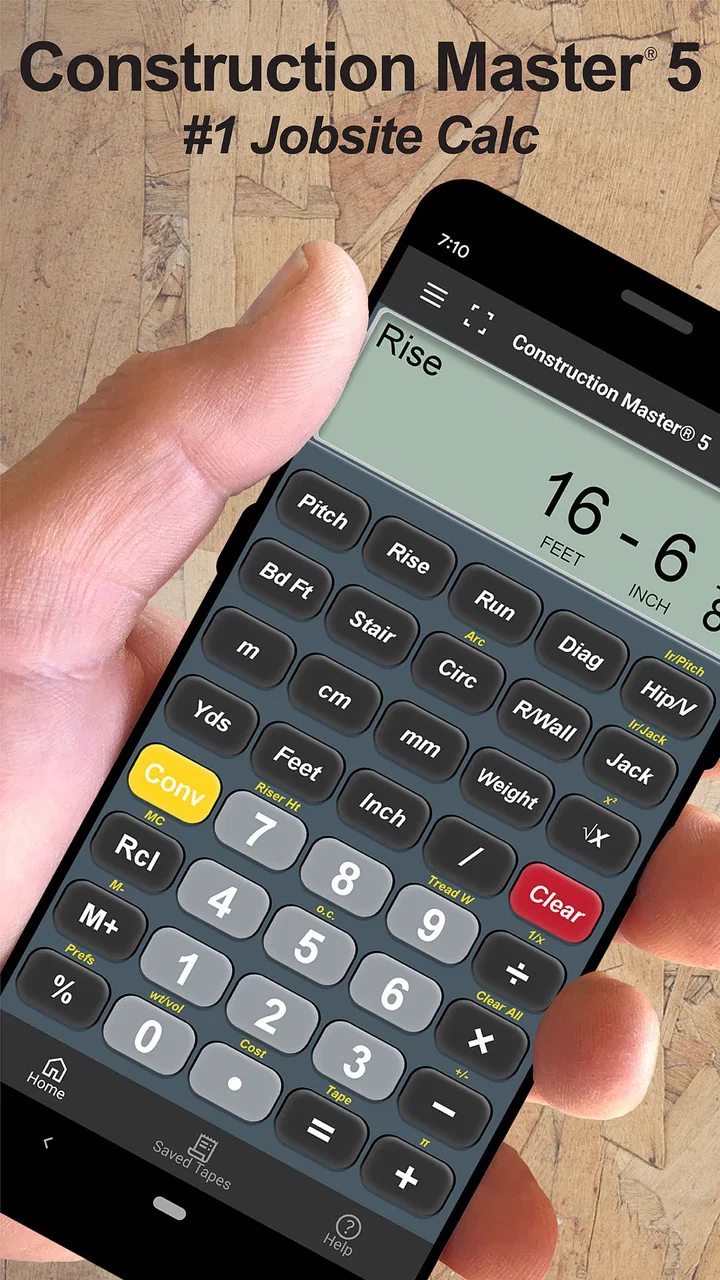
Construction Master 5 Calc
- 4.7
- Rating
- 100.00K
- Installs
- Free
- Price

 Analysis by App-foxy
When I need to turn a measurement into a practical construction answer, I want more than a basic calculator. A normal calculator can handle multiplication and division, but it quickly becomes awkward when the job involves feet, inches, fractions, dimensions, pitch, or material estimates. That is where Construction Master 5 Calc makes sense. I found it most useful as a focused field tool: enter the measurements as they are spoken on a job, work through the calculation without converting everything by hand, and pass a clear result to the next person.
Calculated Industries has built this app for people who already think in construction measurements rather than decimal-only mathematics. It is a free tools app for Android and iOS, rated for Everyone, with a 4.7 average from around 3.5 thousand ratings and more than 100 thousand installs. Those figures suggest that it has found a steady audience among tradespeople, estimators, remodelers, students, and homeowners who occasionally need more precision than the calculator already on their phone can provide.
My overall impression is that it succeeds because it stays close to the way a construction calculation actually happens. The app is not trying to be a project-management system, a drawing package, or a replacement for a full estimating program. It is a specialized calculator, and its value depends on whether your work is dominated by dimensional calculations. If that describes you, the workflow is much more natural than typing every value into a general-purpose calculator.
You May Also Like

 Blood Strike: 2.5 Anniversary
Blood Strike’s Loadouts Turn Every Drop Into a Tactical Gamble
A close look at Blood Strike’s custom loadouts: how fast access to signature weapons reshapes its battle royale rhythm, rewards preparation, and narrows the gap between fights.

 Pandora - Music & Podcasts
Pandora’s Music Is Easy to Start, but Harder to Recover
Pandora’s strength is its low-effort path from a seed to a station. Its weak spot is how much confidence it asks you to place in connection, setup, and quiet recovery.

 8 Ball Pool
 Is Built on Rivalries, Rematches, and Routine
A close look at the rivalries, rematches, shared routines, and unanswered safety questions that turn a quick pool match into a persistent mobile community.

 Samsung Music
’s Quiet Strength Is Playing What You Already Own
Its reach comes less from spectacle than from dependable access to a personal library. That simplicity is both the app’s strongest retention engine and its ceiling.

 AccuWeather: Weather Radar
AccuWeather Review: A Quick, Clear Forecast for Everyday Decisions
For everyday plans, the best forecast is the one you can understand quickly. AccuWeather makes rain timing, radar, and local conditions easy to act on, with a few trade-offs.

 Hill Climb Racing
Why Hill Climb Racing Still Turns Crashes Into One More Run
A tiny car, a bumpy hill and one more upgrade: Hill Climb Racing keeps resurfacing because its simple chaos makes every near-miss feel personal.
More From Our News Desk



From a rough measurement to a usable construction answer
I’ll start with the moment this tool earns its place: a measurement comes in feet, inches, or fractions, and I need a usable result without translating everything into decimals first. That small change in workflow can make a shared job easier to discuss, especially when someone else is waiting on the answer. The next section looks at how that benefit fits into everyday household use.
The starting condition: measurements rarely arrive in perfect decimal form
A realistic job often begins with incomplete or inconvenient information. Someone measures a wall in feet and inches, reads a fraction from a tape, checks a rise and run, or asks how much material is needed for a surface. The first problem is not always the arithmetic itself. It is getting the values into a form that can be calculated without introducing a conversion mistake.
That is the first important strength here. Instead of forcing every measurement into decimal feet or decimal inches before beginning, the calculator is designed around construction-style input. In my experience, that reduces the mental overhead between reading the tape and entering the number. It also makes the display easier to discuss with another person who is standing beside the work rather than sitting at a desk.
This matters especially when several measurements are combined. A small conversion error at the beginning can affect an area, a perimeter, a cut list, or a quantity estimate later. Using a dedicated construction calculator does not remove the need to check the work, but it removes one unnecessary translation step. The practical advantage is fewer opportunities to misread a fraction while converting units manually.
I would still begin by deciding what the answer needs to represent. Is it a linear length, an area, a volume, a slope, or a material quantity? The app can help with the calculation, but it cannot decide whether the measurement was taken from the correct reference point or whether waste should be included. Good input discipline remains part of the workflow.
Entering the numbers without changing the way you think
Once the measurement is ready, the next step is entering it in the form that matches the job. This is where a construction-specific interface feels different from the calculator that comes preinstalled on a phone. A general calculator expects a sequence of abstract numbers and operators. Construction Master 5 is better suited to a sequence such as a dimension, another dimension, and a requested result.
I found this approach particularly helpful when checking dimensions on site. If I am measuring a room for flooring or trying to verify a framing dimension, I do not want to stop and calculate decimal equivalents on paper. I want to enter the values, perform the operation, and read an answer I can use immediately. That makes the phone behave more like a compact trade calculator than a generic app.
There is a learning curve, though. A dedicated calculator has its own vocabulary and operating logic. Someone accustomed only to a four-function calculator may need a little practice before the key layout feels obvious. I would not judge the app after one rushed calculation. The first few sessions are better spent learning how it expects dimensions and operations to be entered, then repeating familiar examples until the sequence becomes automatic.
A useful habit is to say the calculation aloud before pressing the keys. For example, I might identify the two dimensions, state whether I need an area or a length, and then enter them in that order. This is not a special feature; it is a workflow safeguard. It prevents the common mistake of pressing buttons quickly without knowing whether the displayed result answers the question I intended to ask.
Working through a complete everyday scenario
Imagine measuring a small room before buying flooring. I would record the length and width, enter both dimensions, and calculate the area. The result gives me a working figure for the room itself. Before ordering anything, I would then apply my own allowance for cuts, irregular edges, damaged pieces, and the installation pattern. That final purchasing decision should not be treated as identical to the raw area shown by the calculator.
This is an important distinction. Construction Master 5 can make the arithmetic cleaner, but it does not know whether the room has a bay window, a closet, a diagonal layout, or a section that will use a different material. I would divide a complicated space into simpler rectangles or other manageable sections, calculate each part separately, and add the results. That creates a more auditable trail than entering one guessed overall dimension.
The same method works for paint, tile, drywall, decking, or concrete planning, provided I understand the material’s coverage and the job’s waste requirements. The app gives me a reliable calculation environment; I supply the construction judgment. For a homeowner, that can make a consultation with a contractor more productive because the measurements and assumptions are easier to explain.
For a professional, the benefit is speed during repeated checks. A carpenter can verify a dimension without reaching for paper. An estimator can test a quantity while walking through a space. A student can practice construction math using inputs that resemble real measurements instead of purely academic decimals. In each case, the useful outcome is not just a number but a number produced in a format that fits the conversation on site.
Changing the calculation into something another person can use
The handoff is where many small calculation tools become less useful. A result that makes sense to the person who entered it may be unclear to the client, supplier, coworker, or future version of the same person. I recommend treating every answer as part of a short record: note what was measured, which operation was used, and what the result represents.
For example, “area” is not enough if a room contains an opening that was excluded, or if the result is before waste. When I pass along a figure, I would include the source dimensions and the assumption behind it. The calculator helps me obtain the result, but a clear handoff depends on labeling it properly.
This is also where the app’s focused nature becomes both a strength and a limitation. It is excellent for producing the calculation, but it is not the whole documentation process. If your work requires shared estimates, drawings, customer approvals, or a long history of revisions, you will still need another tool or a written system alongside it. I would use this app as the calculation stage in that larger process, not as the place where the entire project lives.
A practical routine is to keep a simple note beside the app, especially for estimates involving several sections. Write the location, the dimensions, the result, and any allowance separately. This makes it easier to recheck an answer later and reduces the chance of using a correct number in the wrong context. The calculator is most dependable when the surrounding workflow is organized.
What the result is good for, and what it is not
The result is most valuable when I need a quick, precise answer from construction-style dimensions. It can support field verification, rough estimating, material planning, classroom practice, and conversations with tradespeople. It is also useful when a general calculator would require several conversions before reaching the same answer.
Its output should not be mistaken for an engineering approval or a complete quote. A calculation can be mathematically correct while the project decision is still wrong because the measurement, material specification, structural assumption, or waste allowance was wrong. I would never use a phone result as the sole basis for a safety-critical structural decision. In those situations, professional plans and qualified judgment take priority.
The app’s free entry point makes it easy to try without committing money immediately. There are in-app purchases ranging from $0.49 to $34.99 per item, so I would check the purchase screen carefully before assuming every available capability is included at no cost. The free availability is attractive for occasional users, while frequent professionals may decide that paid additions are worthwhile if they fit their daily workflow.
Calculated Industries has kept the app current at version 10.20.18, and it requires at least iOS or Android version 12. That operating-system requirement is worth checking before installing on an older device. On a supported phone, the app is easier to justify than carrying a separate calculator when the phone is already part of the site kit.
Where the workflow breaks down
The biggest friction is not arithmetic; it is familiarity. A specialized calculator can be faster than a general one after practice, but slower during the first few uses. If you only need an occasional percentage, quick addition, or household conversion, the standard calculator on your phone may be simpler. Installing this app for a single basic calculation would be unnecessary.
It is also not the right choice for someone looking for a visual planning environment. If your main task is drawing a floor plan, tracking rooms, generating a polished quote, managing subcontractors, or storing project photos, this calculator will feel narrow. A construction estimating or project-management app would be a better center for that workflow, with this tool used only when a specialized calculation is needed.
Another limitation is the risk of false confidence. A clean result on the screen can look authoritative even when the input is uncertain. I would double-check unusual dimensions, confirm whether the unit mode matches the tape reading, and repeat important calculations from a different angle. For a large purchase or a structural task, a second person’s review is more valuable than simply trusting a familiar interface.
There is also a handoff issue for teams. If several people use different methods, one person may report a decimal answer while another expects feet, inches, or fractions. Before sharing a result, I would agree on the output format and write down the original inputs. That small step prevents confusion when the number moves from the field to an estimate, order, or cut list.
Who will get the most from this calculator
I would recommend it to tradespeople who repeatedly work with dimensions, learners studying construction math, estimators who need quick checks, and homeowners doing serious renovation planning. It is especially suitable for people who find unit conversion more frustrating than the actual calculation. The dedicated approach saves time once the input sequence becomes familiar.
It can also be a useful backup for a professional who already owns a physical construction calculator. A phone-based version is convenient when the physical tool is in a truck, misplaced, or unavailable. I would not let convenience replace a dependable site process, but having the calculation tool available on a supported phone is practical.
I would suggest skipping it if your needs are limited to ordinary arithmetic, if you strongly prefer a visual spreadsheet, or if your work depends on shared project records rather than quick individual calculations. It is also a poor substitute for professional advice where the answer affects safety, code compliance, or structural performance.
My final take after following the workflow
Construction Master 5 Calc works best when I treat it as one precise step in a larger construction process: measure carefully, enter the values in their natural form, calculate the requested result, label the answer, and pass along the assumptions. That complete workflow is more valuable than the button presses alone.
Its 4.7 average and broad install base fit my experience of a focused tool that solves a specific problem well. The free price makes experimentation easy, while the optional purchases mean I would review the available functions before relying on it for regular professional work. The Everyone rating also makes it approachable for students and homeowners, not only experienced tradespeople.
My recommendation is straightforward: install it if construction dimensions are a recurring part of your day and you want a faster alternative to manual conversions. Spend a little time learning the input flow, keep notes for handoffs, and verify important results independently. If you need drawings, collaboration, or complete estimating, pair it with a broader app instead of expecting one calculator to manage the whole project. Used within those boundaries, Construction Master 5 Calc is a practical specialist rather than a generic calculator wearing a construction label.
FAQs for Construction Master 5 Calc
01What is Construction Master 5 Calc used for?
Construction Master 5 Calc is a specialized construction calculator designed for builders, contractors, carpenters, remodelers, and other professionals who regularly work with feet, inches, fractions, areas, volumes, angles, and material estimates. It can simplify common job-site calculations, including right triangles, stair layouts, roof pitches, dimensional conversions, and quantity estimates, reducing the need for manual formulas or separate reference tools.
02Does Construction Master 5 Calc support feet, inches, and fractions?
Yes. One of the app’s main advantages is its ability to handle construction-style dimensions rather than forcing users to work exclusively with decimal numbers. You can enter measurements in feet, inches, and fractional inches, then perform calculations and view practical results in a familiar format. This is particularly helpful when reading plans, measuring materials, or checking dimensions directly on a job site.
03Can the app calculate stairs, roofs, and right triangles?
Construction Master 5 Calc includes functions aimed at frequent construction problems, such as solving right triangles, determining rise and run, calculating pitch and angles, and working with stair layouts. It can also assist with roof-related measurements and other dimensional tasks. However, users should always verify critical results against project plans, local building codes, and professional judgment before construction begins.
04Is Construction Master 5 Calc suitable for beginners?
The app can be useful for beginners, but it is primarily designed around professional construction workflows and terminology. New users may need some time to understand the calculator’s keys, modes, and specialized functions. The interface is generally more practical than decorative, so learning the available operations and practicing with simple examples is recommended before relying on it for important measurements or real-world structural decisions.
05Is Construction Master 5 Calc free, and does it work offline?
Availability and pricing may vary depending on whether you download Construction Master 5 Calc for Android or iOS, as well as the edition offered in your region. Some versions may be paid or provide different features and purchase options. Since it is a calculator app, its core calculations are generally intended for use without a constant internet connection, although store downloads, licensing, updates, or support services may require access.
Pros
- Converts between common construction units quickly
- Includes advanced trigonometric and geometric calculations
- Supports fraction and feet-inch input for field measurements
- Stores calculation history for reviewing previous results
- Useful offline
- so it works on job sites without internet
Cons
- The interface looks dated compared with modern calculator apps
- Advanced functions may take time for beginners to learn
- Some features require navigating through multiple menus
- Not designed for general everyday calculations
- Accuracy depends on entering dimensions and units correctly

Construction Master 5 Calc
Gallery